MyRadar Weather Radar Pro
- 4.8
- Rating
- 100.00K
- Installs
- $5.99
- Price

 Analysis by App-foxy
When I need to decide whether to carry an umbrella, delay a walk, or keep an eye on a storm moving toward home, I want more than a single temperature number. MyRadar Weather Radar Pro is built for that moment: it turns a weather check into a visual look at what is happening around me right now. After using it as a daily weather tool, I found that its strongest quality is not simply showing a forecast. It is helping me connect the forecast with the movement of rain, severe weather warnings, and larger systems such as hurricanes.
This is a paid weather app from ACME AtronOmatic LLC, with a 4.8 average from around 10K ratings and more than 100K installs. It is rated for Everyone and runs on operating systems version 10 and later. The price is $5.99, while optional purchases range from $2.99 to $59.99 per item. That makes the decision fairly simple: this is aimed at people who will actually use radar and alert information, not someone who only wants to glance at the daily high and low.
From a vague weather worry to a useful decision
My typical starting condition is not “I want to study meteorology.” It is something ordinary: dark clouds appear while I am preparing to leave, rain is forecast later, or a family member is driving through an area where weather may change quickly. In those situations, a standard weather app often answers only part of the question. It may tell me that rain is likely, but not whether the rain is approaching my location, moving away, or sitting just outside the area I care about.
You May Also Like

 Blood Strike: 2.5 Anniversary
Blood Strike’s Loadouts Turn Every Drop Into a Tactical Gamble
A close look at Blood Strike’s custom loadouts: how fast access to signature weapons reshapes its battle royale rhythm, rewards preparation, and narrows the gap between fights.

 Pandora - Music & Podcasts
Pandora’s Music Is Easy to Start, but Harder to Recover
Pandora’s strength is its low-effort path from a seed to a station. Its weak spot is how much confidence it asks you to place in connection, setup, and quiet recovery.

 8 Ball Pool
 Is Built on Rivalries, Rematches, and Routine
A close look at the rivalries, rematches, shared routines, and unanswered safety questions that turn a quick pool match into a persistent mobile community.

 Samsung Music
’s Quiet Strength Is Playing What You Already Own
Its reach comes less from spectacle than from dependable access to a personal library. That simplicity is both the app’s strongest retention engine and its ceiling.

 AccuWeather: Weather Radar
AccuWeather Review: A Quick, Clear Forecast for Everyday Decisions
For everyday plans, the best forecast is the one you can understand quickly. AccuWeather makes rain timing, radar, and local conditions easy to act on, with a few trade-offs.

 Hill Climb Racing
Why Hill Climb Racing Still Turns Crashes Into One More Run
A tiny car, a bumpy hill and one more upgrade: Hill Climb Racing keeps resurfacing because its simple chaos makes every near-miss feel personal.
More From Our News Desk



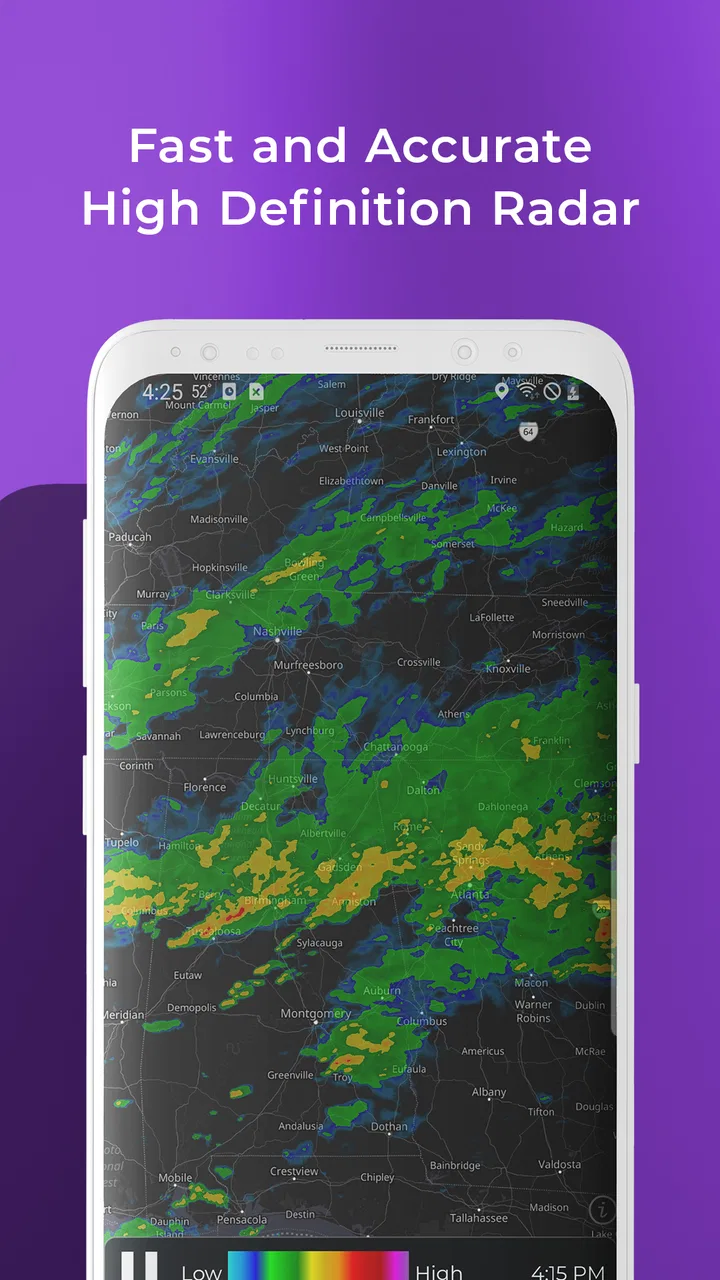
MyRadar makes the map the central part of the experience. The live radar view gives the forecast a sense of direction and timing. I can look at the weather around a location instead of treating my own forecast as an isolated statement. That distinction matters when a shower is narrow, when a storm is moving across a route, or when the weather is changing faster than a morning forecast suggested.
The app also brings temperatures, warnings, hurricanes, and widgets into the same weather workflow. I do not use every part with the same frequency. Radar is the feature I return to most, while warnings become more important when conditions are unsettled. Hurricane information is more relevant during tropical weather, and widgets are useful when I want a quick glance without opening the full map.
One practical tip is to begin with the question you need answered rather than exploring every layer immediately. If I am deciding whether to leave in ten minutes, I start with radar and the nearby area. If I am planning a longer trip, I widen the map and check the broader movement. This keeps the app from becoming a colorful screen that I inspect without making a decision.
Reading the map instead of guessing from an icon
The most useful change in thinking is to treat radar as a moving picture, not a decorative background. A weather icon can represent a broad period, but the radar view helps me judge whether the immediate problem is a passing shower or a larger band of precipitation. I can use that distinction when choosing between leaving now, waiting, or changing plans altogether.
That visual approach is especially helpful for outdoor activities. Before a walk, I look at the nearby radar rather than relying only on the chance of rain. A small patch moving across the area may justify waiting briefly, while a larger line can suggest that postponing the activity is more sensible. The app does not remove uncertainty, but it gives me a better basis for handling it.
There is also a useful trade-off here. Radar can make a weather check feel more precise than it really is. A map shows movement and intensity patterns, but it does not guarantee exactly what will happen at one street or at one minute. I use it to improve a decision, not to promise myself that a clear-looking gap will remain clear.
A realistic everyday workflow
Imagine I am due to meet someone outdoors after work. The starting condition is a forecast that looks manageable, but the sky is becoming darker. I open the app and first locate the meeting area. Then I examine the radar around it, looking for precipitation already nearby and for the direction in which it appears to be moving. I compare that picture with the warning information and the temperature context.
If the radar suggests a short interruption, I might keep the plan and choose a nearby indoor fallback. If the map shows a broader system approaching, I can message the other person before leaving rather than discovering the problem halfway there. The handoff is important: the app provides the evidence, but I still need to turn it into a practical message, route change, or timing decision.
For a family member on the road, I would use the same process differently. Instead of focusing only on my own location, I would inspect the area along the route and consider whether warnings affect the destination or the journey. This is one of the app’s less obvious strengths: the map encourages me to think geographically, while a simple local forecast encourages me to think only about the place where I am standing.
When I am checking conditions for someone else, I also avoid sending a vague message such as “the weather looks bad.” A more useful handoff is specific: rain appears to be moving toward the area, a warning is visible, or the route may be affected. MyRadar helps me form that kind of update, but the quality of the handoff still depends on reading the map carefully.
Widgets for the first glance, radar for the second
The widgets are most useful as an entry point. They can reduce the friction of checking basic conditions during a busy morning, especially when I do not need the full map. I see them as a quick status panel rather than a replacement for radar. If the widget looks ordinary but the sky or local reports seem unusual, I open the app and investigate instead of assuming the quick view tells the whole story.
This two-step habit works well: use the widget for awareness, then use the radar when the decision has consequences. It prevents me from opening a detailed map for every routine temperature check, while still keeping the deeper information close at hand. For people who dislike constantly navigating weather screens, that separation makes the app easier to live with.
The limitation is that a widget can encourage passive checking. It is convenient, but convenience can lead me to accept a small snapshot when I really need context. My recommendation is to reserve the widget for routine awareness and make the full radar view part of any decision involving outdoor plans, travel, or severe weather.
Warnings and hurricanes change the priority of the workflow
Warnings are not just another layer to glance at after checking the temperature. When one appears, it changes the order of operations. I first identify the affected area, then consider whether my location, route, or people I care about fall inside it. The right outcome may be to cancel an activity, move indoors, or seek more official guidance rather than continuing to watch the map casually.
Hurricane information serves a different purpose from ordinary rain radar. It is relevant to a wider, longer-running weather situation, where the question is not simply whether I will get wet on the way to a shop. I would use that part of the app to maintain awareness of a developing tropical system and to keep checking how the situation relates to places that matter to me.
A non-obvious but important point is that the app can support different time horizons in one routine. Radar helps with the next practical decision, warnings help identify immediate risk, and hurricane information helps maintain broader awareness. I find that combination more useful than treating every weather feature as if it answered the same question.
Still, I would not make this app my only source during dangerous conditions. A radar display is valuable for understanding what is happening, but official emergency instructions should take priority when a warning affects safety. The app is best used as an awareness and planning tool, not as permission to ignore evacuation guidance or other local instructions.
Where the handoffs create friction
The first handoff is between the app and my own interpretation. Weather maps require attention. Colors, movement, and warning areas can be easy to skim incorrectly when I am in a hurry. I have learned to pause long enough to identify the location, the direction of movement, and the time frame relevant to my plan. That small discipline prevents a dramatic-looking map from automatically becoming a bad decision.
The second handoff is between the app and another person. If I am coordinating a trip or outdoor event, I still have to explain what I saw in plain language. The app does not replace that conversation. Its value is that I can base the conversation on a visible local situation rather than a vague feeling that the forecast may be wrong.
The third handoff is between free-looking convenience and paid ownership. The $5.99 price means I would think about my habits before installing it as my main weather tool. Someone who checks weather only once each morning may find a simpler option sufficient. Someone who routinely watches storms, plans outdoor work, or needs radar context may get much more value from the purchase.
Optional purchases can add another layer to that decision, with individual items priced from $2.99 to $59.99. I would not assume that every user needs them. My approach would be to start with the core experience, identify whether the radar and warning workflow actually improves my decisions, and only then consider an extra purchase that solves a specific need.
How it compares with ordinary weather apps
Compared with a basic weather app, MyRadar feels more immediate and spatial. A conventional forecast is often better for a quick daily summary: temperature, broad conditions, and a simple outlook. That is enough for many people, and I would not recommend paying for a radar-focused app if those are the only details they need.
MyRadar becomes the better choice when timing and movement matter. The difference is most noticeable when rain is nearby but not yet overhead, when a storm is crossing a route, or when a warning needs to be understood in relation to a map. Instead of asking only “what is the forecast here?”, I can ask “what is moving toward here, and what should I do next?”
A dedicated weather service may still be preferable for someone who wants highly detailed long-range planning, specialist information, or a very minimal interface. MyRadar’s identity is visual and situational. Its strength is the handoff from map to action, not necessarily the quietest possible presentation of weather facts.
I also would not choose it solely because it has a high average rating or a large installed base. Those figures suggest that many people find it useful, but they do not tell me whether my own routine needs live radar. The deciding question is personal: do I regularly need to judge the movement of weather, or do I only need tomorrow’s temperature?
Who will get the most from it
I think the app is a strong fit for commuters who travel through changing weather, parents coordinating outdoor activities, hikers and walkers who check conditions before leaving, and anyone who wants a closer look during stormy periods. It is also useful for people who naturally think in maps and routes rather than in isolated forecast numbers.
It can be particularly helpful for planning around uncertainty. I might not know whether a shower will affect a specific appointment, but I can inspect the surrounding pattern and choose a safer or more comfortable plan. That does not make the forecast perfect; it makes my response more informed.
On the other hand, I would suggest skipping it if the goal is only a simple temperature display, a basic morning forecast, or the smallest possible weather app. Paying for radar that will rarely be opened is poor value. I would also be cautious about using it as the sole authority for severe-weather action, because visual information should support—not replace—official instructions.
The result after using it as a daily tool
My overall result is that MyRadar makes weather checking more active and more useful. I am not merely reading a prediction and hoping it matches reality. I can look at nearby movement, connect it with warnings, consider the timing of my plan, and pass a clearer update to someone else. That complete workflow is the reason I would recommend it to a friend who often says, “I wish I knew whether that rain was actually coming this way.”
The app’s best outcome is better short-term judgment. I can decide whether to leave now, wait, change a route, move an activity indoors, or keep monitoring a developing situation. The widgets help with the first glance, while the full map does the real work when the decision matters.
There is friction: the paid entry point, optional purchases, the need to interpret a map, and the risk of false confidence. Those are not minor details. They define who should use it. MyRadar is not the simplest answer to every weather question, but it is a focused tool for people who need to understand weather in motion.
For me, that makes MyRadar Weather Radar Pro worth considering when a normal forecast feels too vague. I would install it for radar-led planning, use the widget for quick awareness, check warnings with care, and keep official emergency guidance above everything else. If that matches the way you make weather decisions, the app offers a practical bridge from changing conditions to a sensible next step.
FAQs for MyRadar Weather Radar Pro
01What is MyRadar Weather Radar Pro, and what does it offer?
MyRadar Weather Radar Pro is a feature-rich weather app designed to provide fast, visual information about current conditions and approaching weather. After exploring the app, its main strengths are animated radar maps, forecasts, severe weather alerts, temperature details, and location-based updates. It is especially useful for checking rain movement, storms, wind, and changing conditions before commuting, traveling, or planning outdoor activities.
02Is MyRadar Weather Radar Pro accurate and reliable for severe weather?
MyRadar Weather Radar Pro can be a useful tool for monitoring weather patterns, but no weather app should be treated as a replacement for official emergency warnings. Radar imagery and forecasts depend on the available data sources, location, update timing, and local conditions. The app is helpful for seeing storm movement and receiving alerts, while users should still follow guidance from national weather services and local authorities during dangerous weather.
03Does MyRadar Weather Radar Pro provide real-time weather alerts?
The app is built around timely weather information and may provide notifications for severe conditions, depending on the enabled features, device permissions, subscription level, and location. During testing, the alert experience is most useful when notifications and location access are configured correctly. Users should review the app’s alert settings after installation, because battery restrictions, disabled permissions, or regional limitations can affect when and how notifications are delivered.
04Is MyRadar Weather Radar Pro free to download, or does it require payment?
MyRadar is generally available as a free download, but the Pro version and some advanced tools may require a purchase or subscription, depending on the platform and current store offering. Premium features can include additional radar, forecast, alert, or customization options. Before downloading or upgrading, check the Google Play Store or Apple App Store listing carefully for the exact price, billing terms, trial conditions, and included features.
05Does MyRadar Weather Radar Pro use location data and work on both Android and iOS?
MyRadar Weather Radar Pro is designed for mobile devices and is available through major Android and iOS app stores, although supported versions and features can change over time. Location access helps the app display local forecasts, radar information, and relevant alerts. You can usually choose approximate or precise location access and adjust permissions later, but limiting location services may reduce the accuracy or convenience of automatic weather updates.
Pros
- Accurate radar maps provide useful precipitation tracking at a glance.
- Weather alerts can help users prepare for approaching severe conditions.
- Supports multiple map layers for more detailed local weather analysis.
- Location tracking makes it easy to monitor weather wherever you travel.
- Clean interface lets users access radar information with minimal effort.
Cons
- Many advanced features require a separate subscription or paid upgrade.
- Radar imagery may consume significant mobile data during frequent use.
- Forecast accuracy can vary in areas with limited weather station coverage.
- Some alerts may arrive late depending on regional data providers.
- The app can feel crowded when several map layers and overlays are enabled.

MyRadar Weather Radar Pro
Gallery